
See how HubSpot automations actually connect
Map inbound and outbound workflows across a connected portal — who enrolls whom, which properties they share, and where automations break — before you change a thing.
Know who enrolls whom before you edit a workflow
- ✅ Catch broken enrollments and empty flows early
- ✅ See property, list, and workflow links in one view
- ✅ Gather clusters before you archive or rewrite a hub
- ✅ Share a report that partners and clients can both read
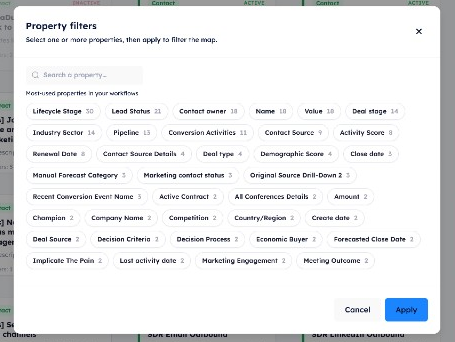
Isolate every workflow that touches a property
- ✅ Search and select from properties your automations actually use
- ✅ Hide everything else so duplicate writes and shared enrollment stand out
- ✅ A badge on the filter icon shows how many properties are applied
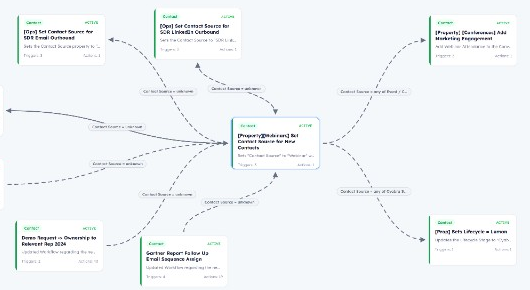
Pull a hub into one cluster
- ✅ Inbound cards sit to the left, outbound to the right
- ✅ Lines stay labeled with the property, list, or enrollment that links them
- ✅ Stays disabled until the selected workflow has at least one connection
How Workflow Maps work
Connect a portal, generate a map, then explore links and share the report — no CSV export required.
Connect your portal
Use your existing HubSpot OAuth connection. Maps run against the live portal — the same account you already use for imports and deployments.
Generate a map
HubCreate scans every workflow, scores structural issues, and lays cards on object-type lanes with inbound and outbound links.
Explore and share
Center or gather connected workflows, then send the public report — health score, findings, and recommended actions — to your client.
What’s included in a Workflow Map
The same structure you use elsewhere in HubCreate — cards, findings, and a shareable report.
Inbound & outbound links
Direct enrollments, lists, and shared property writes — counted as unique neighboring workflows.
Object-type lanes
Cards sit on contact, company, deal, ticket, and other object rows so the map stays scannable.
Center & Gather
Pan to a workflow, or pull its unique neighbors in close so clusters are easier to explain.
Findings & actions
Empty, stale, standalone, duplicate writes, missing triggers, and circular enrollments — each with a recommended next step.
Shareable report
Health score, analysis charts, inventory, most-used properties, and partner comments — no login required to view.
Alongside Portal Audits
Portal Audits cover the whole HubSpot account. Workflow Maps are the automation graph you share in the same client conversation.
Ready to grow and scale your HubSpot business?
See how HubCreate can help

Deploy assets instantly, monitor account health continuously, and optimize performance proactively. All the tools you need to manage your HubSpot client portfolio in one platform.