
Navigating the workflow map
The map canvas is a pan-and-zoom board. Use the toolbar and left rail to find workflows without losing your place.
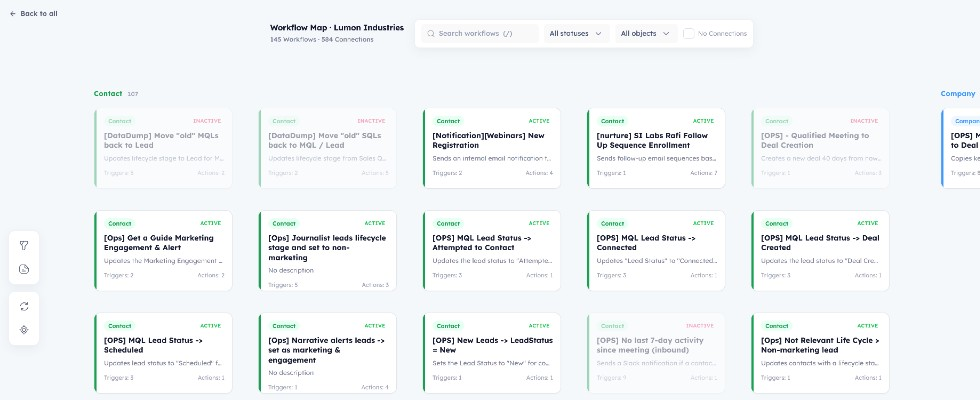
The map canvas with the top toolbar and left rail visible.
Toolbar
- Search — filter cards by name. Press
/to focus the field. - Status — All, Active, or Inactive.
- Object — limit the board to one CRM object type.
- No Connections — show only workflows with no inbound or outbound links (standalone).
Property filters
The filter icon on the left rail opens a modal of the most-used properties in this portal’s workflows. Select one or more, then Apply. The map keeps workflows that write or enroll on those properties. A badge on the icon shows how many filters are active.
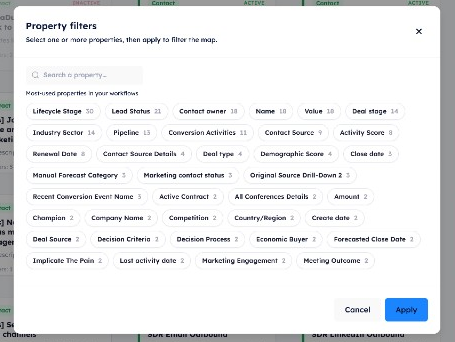
Choose one or more properties, then Apply to filter the map.
Left rail
- Property filters — open the property modal.
- Full report — opens the public Workflow Map Report in a new tab.
- Reset layout — puts cards back on their default lane positions. It does not change pan or zoom.
- Recenter — resets the camera (pan and zoom) only. Card positions stay as you left them.
Saved layout
Card positions, pan, and zoom are stored in this browser for that map (keyed by the public report token). Another computer or a private window starts from the default layout. Reset layout writes the default card positions back to that saved layout and keeps your current camera.
Opening a workflow
Click a card to open the workflow drawer. Related cards stay highlighted; unrelated cards fade.