
Workflow drawer
Click a workflow card to open the drawer on the right. The drawer is the detail view: enrollment, actions, connections, findings, and timeline.
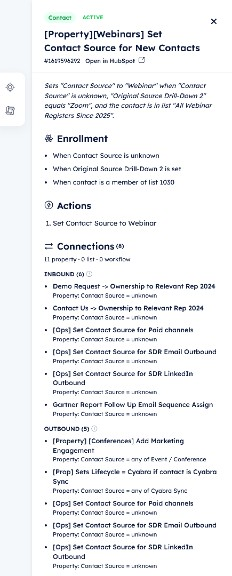
Drawer with Center on Workflow and Gather Workflows on the left edge.
Header
- Object type and active / inactive status
- Workflow name and HubSpot ID
- Open in HubSpot — jumps to that workflow in the connected portal
Center and Gather
A small rail sits on the left edge of the drawer:
- Center on Workflow — pans the camera so this card is in view. Does not move other cards.
- Gather Workflows — pulls unique connected workflows toward this card so the cluster is easier to read. Counts unique neighboring workflows, not every property-edge between the same pair.
Gather stays disabled until the selected workflow has at least one connection.
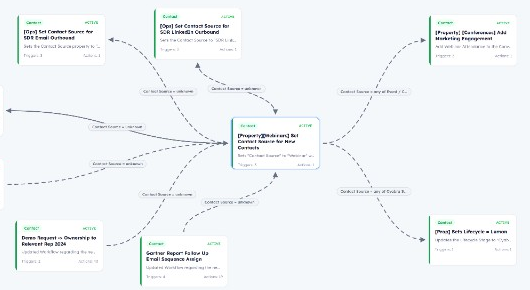
Gather pulls unique connected workflows in around the selected card.
Sections
- Enrollment — how records enter this workflow.
- Actions — mapped steps (property writes, enrollments, and similar).
- Connections — Inbound (workflows that feed this one) and Outbound (workflows this one can start). Headings show unique workflow counts. The breakdown line still lists property, list, and workflow edge kinds.
- Audit findings — the same issue codes and copy as the report (critical / warning / info), with recommended actions in gray Last Run-style boxes. Naming-only flags are not shown here.
- Timeline — created, last updated, and last run when HubSpot provides them.