
What is a workflow map?
A Workflow Map is an OAuth scan of a connected HubSpot portal. HubCreate pulls live workflows, then draws how they enroll records, write properties, and start other automations — so you can see the graph, not a CSV export.
This is different from the archived CSV workflow audit. Maps use your HubSpot connection. Portal Audits remain a separate product: they review the whole portal (data health, marketing, sales, service). Workflow Maps are only the automation layer.
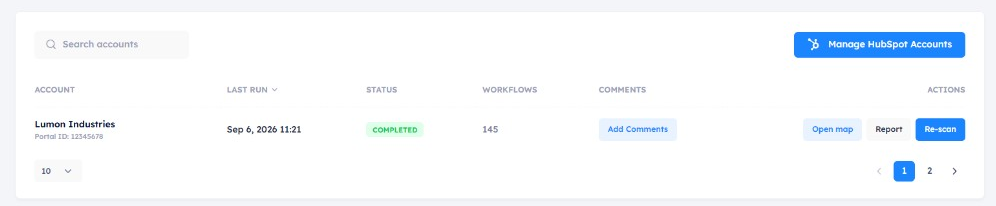
Tools → Workflow Maps lists every connected HubSpot account. Run a map if it has never been scanned, or re-scan the existing one.
All Workflow Maps
There is one map per connected HubSpot account. The list is the accounts you have connected, not a history of past scans. Each row shows:
- Last run — when the map last finished (or Scan running… while a scan is in progress).
- Status — Never, In progress, Completed, or Failed.
- Open map and Report — after a completed scan. The report is a public link; anyone with it can view it without a HubCreate login. Partner comments on the list appear on that report.
- Run map or Re-scan — first scan, or refresh the same map. Re-scan keeps the same report and map URLs.
Only one scan can run at a time for a given account. If a scan is already in progress, wait for it to finish (the list reloads while it runs). A scan that stalls for more than 30 minutes is marked Failed so you can re-scan.
How to start a map
- Connect the HubSpot account in HubCreate if it is not already connected.
- Open Tools → Workflow Maps (sidebar). Every connected account is listed.
- Click Run map on an account that has never been scanned, or Re-scan to refresh an existing map.
- When status is Completed, open the map canvas or the shareable report.
What you see on the canvas
- Object-type lanes — contacts, companies, deals, tickets, and other objects each get a row.
- Cards — one card per workflow, with status (active / inactive) and object type.
- Links — inbound and outbound connections: direct workflow enrollment, list membership, or a shared property write that another workflow enrolls on.
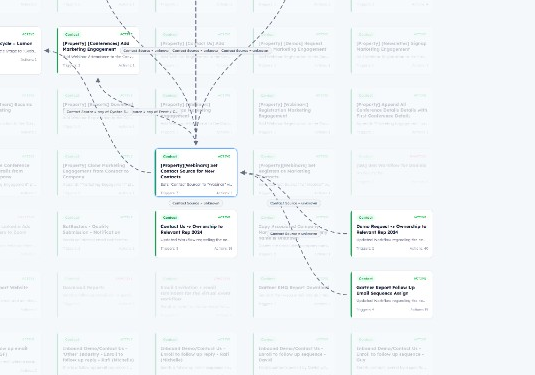
The map canvas: lanes, cards, and connection lines between automations.
Related guides